

Official websites use .gov
A .gov website belongs to an official government organization in the United States.

Secure .gov websites use HTTPS
A lock (
) or https:// means you’ve safely connected to the .gov website. Share sensitive information only on official, secure websites.


Logging in to Your Account
The following steps are required to log into your account:
- Click the "Login to iEdison" box on the iEdison homepage
- Click "Continue" to consent to the terms of use
- Log in using your PIV card
1. Click the "Login to iEdison" box on the iEdison homepage
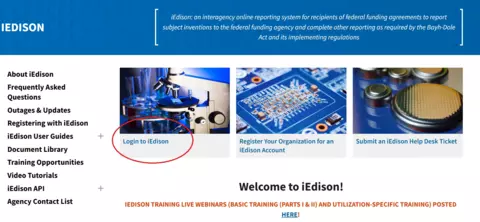
This will redirect you to the iEdison terms of use agreement.
2. Click "Continue" to consent to the terms of use
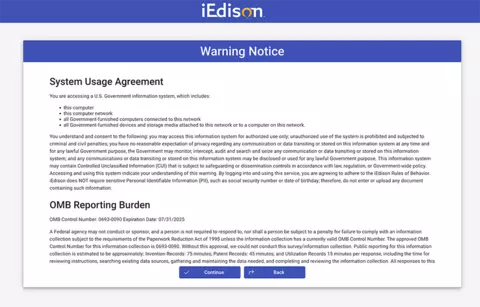
You will then be redirected to login.gov.
3. Login using your PIV card
Click "Sign in with your government employee ID" to login with your PIV/CAC card.
NOTE: IN ORDER TO LOGIN TO IEDISON, THE EMAIL ADDRESS USED FOR YOUR LOGIN.GOV ACCOUNT MUST MATCH THE EMAIL ADDRESS USED FOR YOUR IEDISON ACCOUNT. IF YOU ARE GETTING A MESSAGE THAT YOUR LOGIN HAS FAILED, PLEASE CHECK TO SEE IF THESE TWO EMAILS MATCH. IF THEY DO NOT, YOU WILL NEED TO EITHER (1) CHANGE THE EMAIL ADDRESS ASSOCIATED WITH YOUR LOGIN.GOV ACCOUNT OR (2) ASK YOUR agency'S IEDISON ADMINISTRATOR TO CHANGE THE EMAIL ADDRESS IN YOUR IEDISON PROFILE.
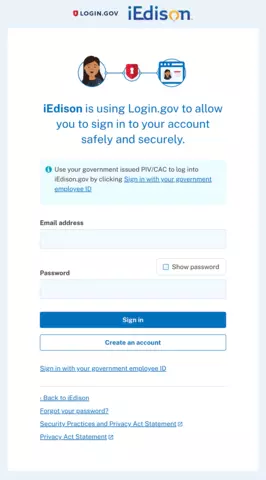
After logging in, you will then be redirected to your iEdison dashboard.
additional note: iedison requires agency users to use their piv/cac card as the primary authentication method through login.gov. if you have gotten a new piv/cac card or updated your certificate, you will need to go to login.gov to update your authentication method. it may take login.gov a couple business days to update the authentication method. in the meantime, you can reuqest the agency administrator give you a temporary waiver to login with username and password and alternative authentication (like phone number, app, etc.).
instructions to enter waiver date of PIV/CAC card usage on user profile (this action can only be done by agency administrators):
- Search for user via "User Profiles" on the Sidebar Main Menu.
- In their profile, scroll down to "Waiver to use password to sign on temporarily."
Enter date to extend the period of using username/password to log into iEdison. There is a maximum of seven days.
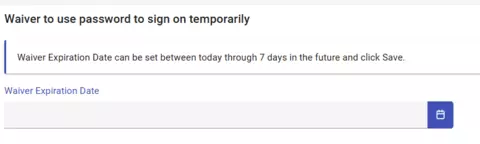 Credit: iEdison
- Click "Save" in the top right hand corner of the user's profile.