

Official websites use .gov
A .gov website belongs to an official government organization in the United States.

Secure .gov websites use HTTPS
A lock (
) or https:// means you’ve safely connected to the .gov website. Share sensitive information only on official, secure websites.


Device Control Panel
Device Control Panel Overview
Device Control Panel shows hierarchical representation of devices and nodes and can be customized per instrument. Each item in the hierarchy represents a device, node, or container section.
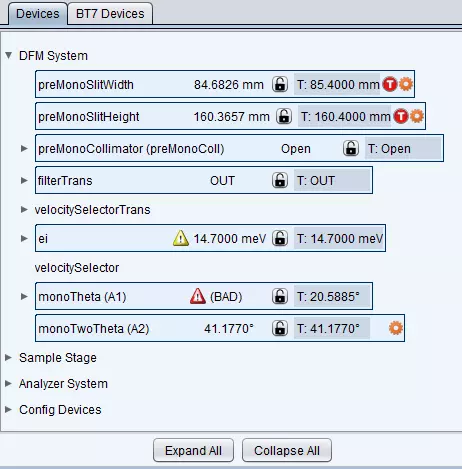
Each device/node item is shown in display mode, by default, for compactness’ sake. When the users click on any of the devices/nodes, the view changes into a control view allowing the user to move or dryrun devices and nodes.
Here is an example for a typical representation for a device. If device has a primary node, its current and target values are be displayed in a manner showed below.
Display mode:

Control mode:
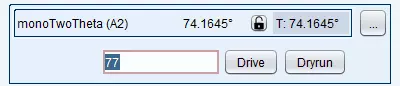
In control mode, you can also view the rest of the properties that belong to the device by clicking the […] button.
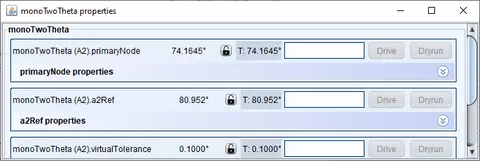
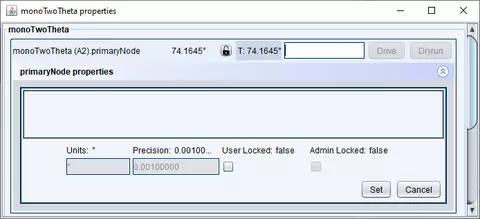
| Every property (device node) also has meta properties that can be changed by clicking the double error button |

|
Depending on the setup, the users may be able to change units, precision, and whether the node can actually allowed to be moved.
Customizing Device Control Panel
Device Control Panel represents a collection of devices and nodes that can be hierarchically organized based on scientists’ needs. The hierarchy itself is stored in a json file called device_hierarchy.json. Every instrument has its own version and is stored under “instrument_configs” folder in our code base. For example for bt7 instrument, the file is located at:
instrument_configs/bt7/device_hierarchy.json.
If you look at the contents of the file, you might get a bit overwhelmed trying to modify it. For that reason, I have created a utility that allows you to update the contents of the file programmatically. This way, the users don’t have to deal with json format.
- In source code navigate to nice/general/json /GenerateInstrumentDeviceControlHierarchies.java.
- Currently this utility allows you to generate the hierarchy for the following instruments: BT4, BT7, MACS, Magik, 10mSANS, and SpinEcho. Other instruments can be added to the list of necessary.
- Locate the method that corresponds to your instrument eg:
- spinEchoHierarchy()
- macsHierarchy()
- ….
- Create or update existing hierarchy:
- Make sure every device or node is created under root “Devices”
- Example:
- JsonTreeNode rootNode = new JsonTreeNode("Devices");
- JsonTreeNode dfm = rootNode.addChild("DFM System");
- Example:
- Every node you create may represents a simple directory name, however if the name corresponds to a device or node that exists on the system, it will be converted to a widget (see example above).
- For example the code below creates a folder named “DFM System” and adds ei and monoTheta devces under it.
- Make sure every device or node is created under root “Devices”
|
JsonTreeNode rootNode = new JsonTreeNode("Devices"); |
4. Here is the corresponding json structure:
|
{ "nodeID": "Devices", "children": { "elementClass": "nice.general.json.JsonTreeNode", "elements": [ { "nodeID": "DFM System", "children": { "elementClass": "nice.general.json.JsonTreeNode", "elements": [ { "nodeID": "ei", "children": { "elementClass": "java.lang.Object", "elements": [] }, "isDevice": false }, { "nodeID": "monoTheta", "children": { "elementClass": "java.lang.Object", "elements": [] }, "isDevice": true, "widgetClass": "nice.client.swing.panels.device.MonoThetaNodeControlComponent" }, |
5. Here is an example of how it might actually look on a real instrument:
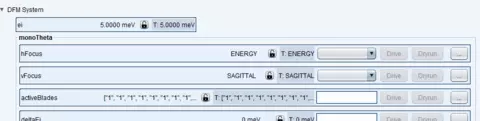
- Note that Device Control Panel is smart enough to recognize devices and nodes and display them properly.
- In Json, any container should be marked with the isDevice = false flag. This is important, because otherwise, it will be displayed as though it were a device which is simply not installed. The generator does it by default, unless you pass in an extra flag.
- widgetClass option lets you customize how the device is displayed in control mode. For example, for macs we have a special widget for displaying monoTheta properties.
- We have custom widgets for displaying motors and any device that does not have a primary node. In the future we are planning to add more widgets to display temp controllers and counters.
- When you are done. Run java code to generate the actual json file.
- Right-click on the file and then click on Run GenerateInstrumentDeviceControlHierarchies.main().
- It will NOT work right away because the program will ask you to select an actual instrument.
-
- Click down error on configuration menu and select “Edit Configurations” option
-
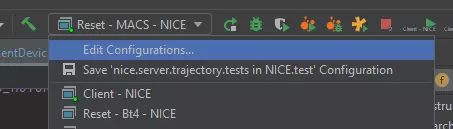
-
- Choose GenerateInstrumentDeviceControlHierarchies
- fill in the name for the instrument in program arguments and hit ok
-
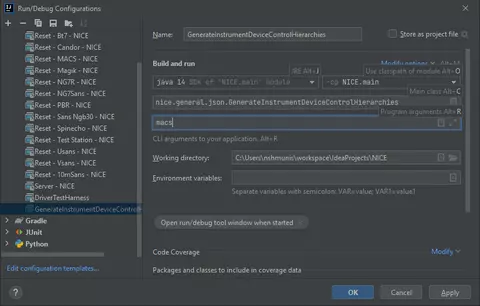
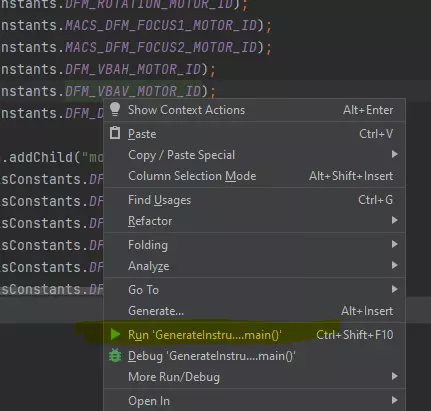
- Now you can return the configuration and generate the json file.
- The console widow will show where it generated the file .
- For example:
- json file C:\Users\nshmunis\workspace\IdeaProjects\NICE\device_hierarchy.json-macs
- Open this file and copy its contents into the corresponding device_hierarchy.json file for your instrument.
- You will need to restart the server in order for the changes to take effect.